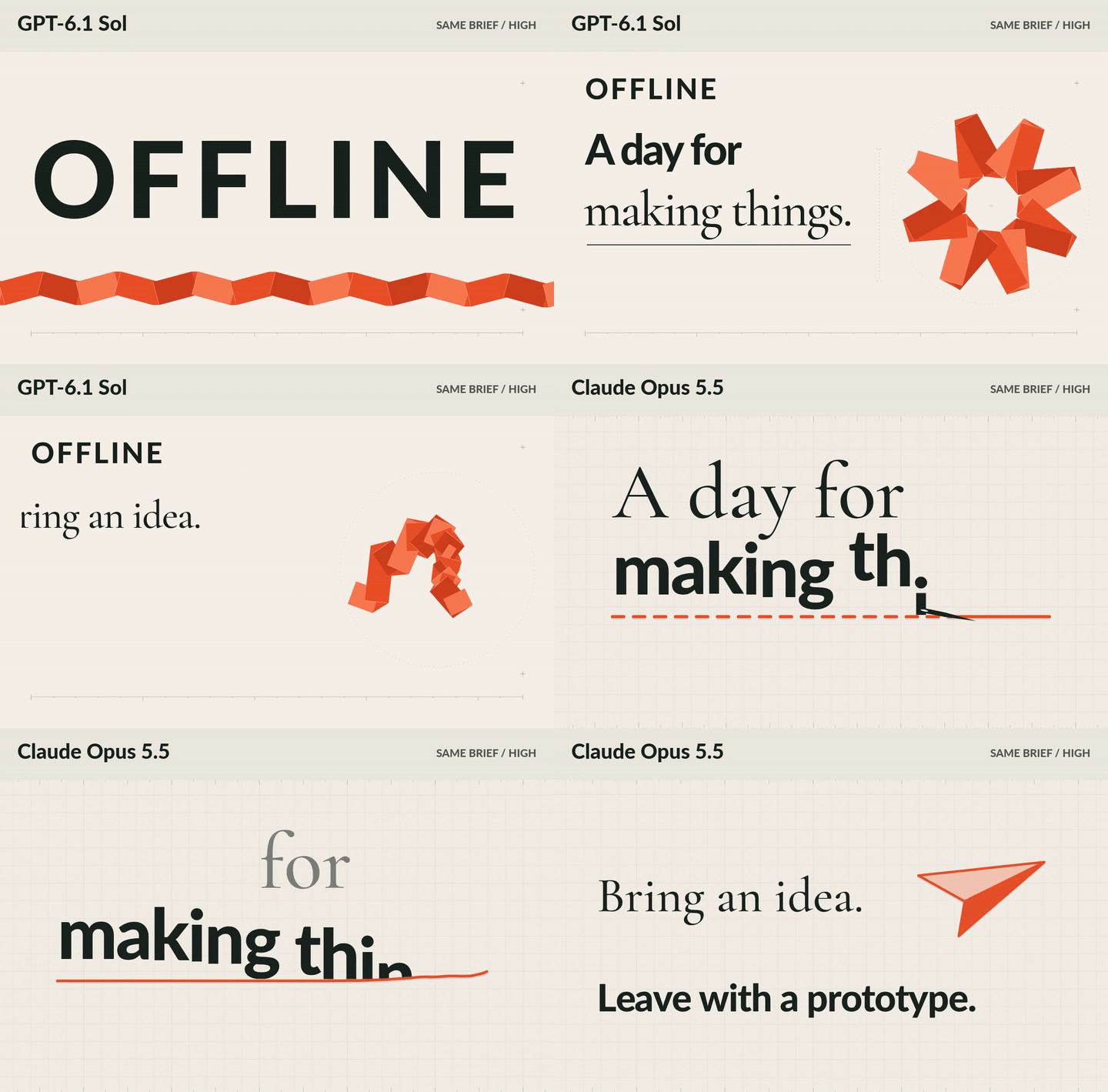
A first render shows a model's taste. A revision shows whether you can keep working with it.
We gave GPT-6.1 Sol and Claude Opus 5.5 the same brief for a 15-second event teaser, then changed the hours and added a line. Both were set to High effort in their respective providers, with the same local fonts and Remotion starter.
Start with a brief you can reuse
This works for an event-page hero, workshop announcement or social teaser. Give the model exact copy, a visual direction and an output contract. Here is a shortened version of our brief:
Create a silent, 15-second motion-design film for OFFLINE, a fictional one-day event for people who make things.

Use this exact copy, in order:
OFFLINE
A day for making things.
Bring an idea. Leave with a prototype.
Saturday / 10 AM–6 PM

Translate physical creativity into graphic motion. Invent one visual motif that evolves across the film. Use confident typography, expressive transitions and readable holds. Avoid a succession of title cards, stock gradients, gratuitous 3D and fake UI.

Palette: warm ivory #F4F0E7, ink #17221C, orange #E94F24. Use the supplied local fonts.

Build in Remotion: 1280×720, 30fps, exactly 450 frames. Keep editable source, review the film and render v1.mp4. Use React, SVG and CSS; no generated images or video.
The model writes the composition; Remotion renders that code into video. Text, shapes and timing stay editable. No video-generation model made these films. The download supplies the starter, fonts and full brief; Remotion's license terms apply.
Compare the decisions, not just the first frame
Sol built the stronger event identity. An orange folded ribbon becomes a rosette, then an arch. OFFLINE stays on screen after the opening, and the typography gives each message a generous hold. The trade-off is repetition: most beats put text on the left and the paper object on the right.
Opus made the clearer visual story. An orange line becomes a scribbled idea, resolves into a paper plane, then draws the slash in the schedule. That gives “idea to prototype” a visible payoff. But the event name disappears after the opening, and some letter-by-letter entrances take longer than they need to.
For this brief, we prefer Opus's concept for a social teaser and Sol's persistent identity for an event-page hero. Either would benefit from tighter text entrances before a real campaign.
These are two runs on one brief through different provider workflows, so the comparison shows the trade-offs in these two outputs. It does not establish a general model ranking.
Ask for a change with boundaries
A useful second test is a small change that must leave the approved work alone:
Change the hours to 10 AM–8 PM. Add “All materials included.” beneath them. Keep the first 9 seconds and all other copy unchanged. Preserve the 15-second duration and v1; save revised source separately and render v2.mp4.
Both changed the hours, added the exact line and preserved all 270 frames of the opening nine seconds pixel for pixel. Both kept the original source and exported a separate revision.
Sol added the line below its divider. Opus shifted the closing layout upward to make room. Both made the new line too small for comfortable mobile reading. Before using either for a real announcement, enlarge that supporting text and check it at the size people will actually see.
For your own comparison, check three things: the requested copy changed, it still fits, and the part you asked to preserve actually stayed intact. Keep the original export alongside the revision.
Put the feedback on the frame in Voyager
In Voyager, our desktop app, we paused on the closing schedule and pinned that request to the hours. The attached review gives the agent the file, timestamp and marked point together. You can direct a visual change without exporting a screenshot and describing where to look.
Description / transcript
The actual Voyager desktop shows a saved note on the original Opus film at thirteen seconds. A close crop holds the note for reading: change the hours, add a materials line and preserve the first nine seconds. The actual Attach button is enlarged, followed by a held close-up of the resulting review attachment in the composer. The returned revision appears beside the agent response; this screenshot is held and generation waits are omitted. The last three seconds of each revised film play at original speed, Sol then Opus.
Download the prompts, four films and editable projects. Extract the whole ZIP and open index.html to compare the original and revised videos offline.
Make your next project in Voyager
Create an account, download Voyager, and start making.