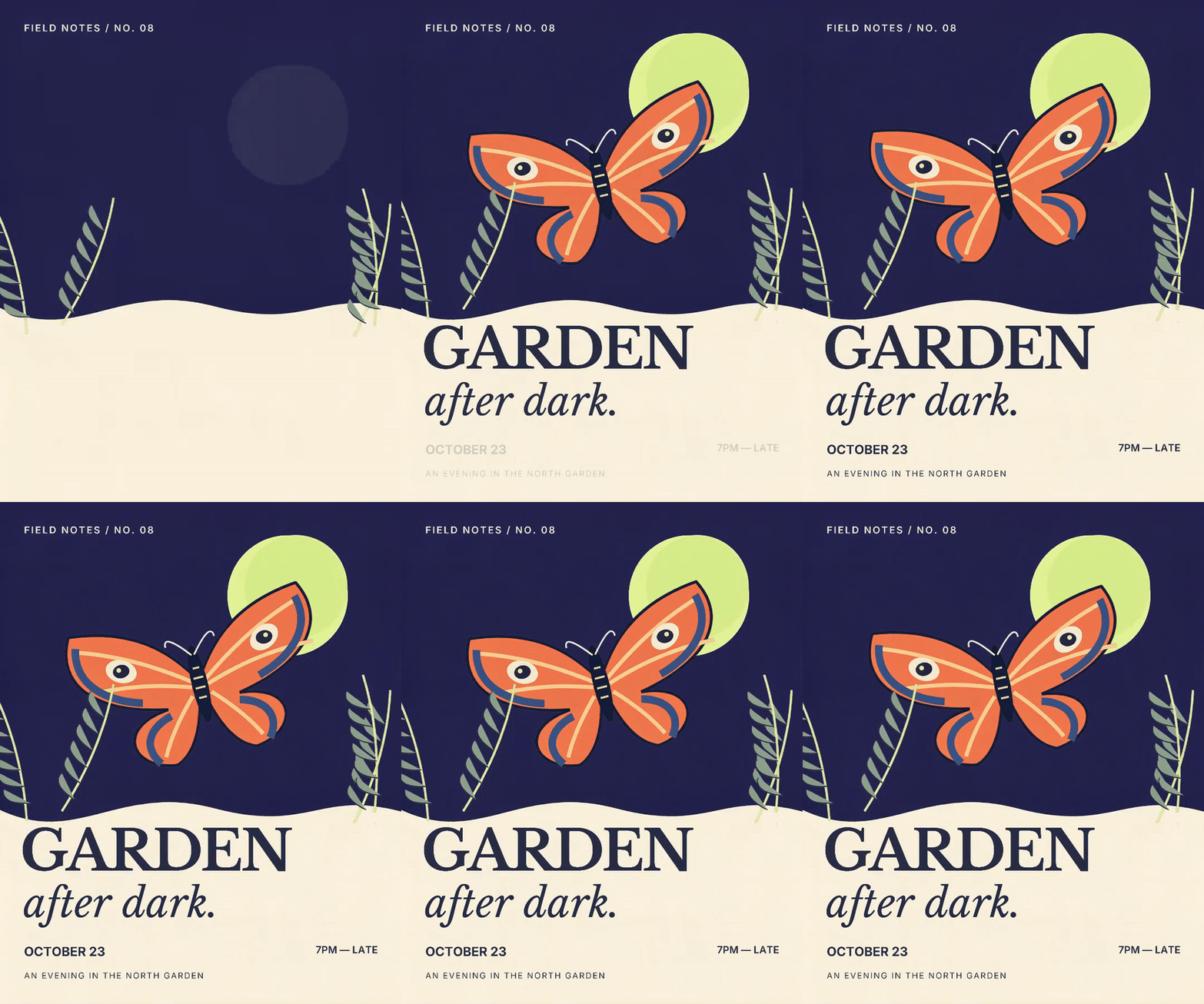
The event poster is approved. Now you need a moving version for social, and the date has just changed. Animate a single flat image and every revision still means repairing pixels or rebuilding the export.
Start by separating the artwork and rebuilding the words as live text. Using Seedream 5 Layers, also available in Runway's Layers workflow, we turned one garden-poster PNG into a seven-second animation. Then we changed the date without changing the artwork or motion. The prompts and editable files are below.
Download the original, separated PNGs and editable motion files.
Separate the poster into image layers
We started with a flat illustration and used Seedream 5 Layers through fal’s layer-separation API. The important decision comes before the request: choose objects that make sense as independent pieces.
Separate this poster into a clean background, the moon, the complete moth,
the foreground plants and the typography. Keep the moth, including its
antennae and wing markings, together as one object. Preserve placement
and color. Give each foreground object genuine transparency, and
reconstruct the background behind it so the pieces can move independently.
We received six images, including an extra background layer. We used the clean base, moon, moth and plants. The model reconstructed some texture and edges; separation does not recover the original source artwork exactly.
Before animating, hide each foreground layer and inspect what is underneath. Then place the cutout over a contrasting color to find halos or opaque rectangles. Moving an object reveals defects a static composite can hide.
Rebuild the words as live text
The separated lettering was still pixels. It could move, but changing the date would mean editing an image again. We rebuilt the title, date and venue as live text in Voyager Design, using Libre Baskerville and Inter.
Rebuild this poster as an editable .vdesign document. Use the separated
background, moon, moth and plant images in their original positions.
Recreate the lettering as live text. Keep the date on its own named layer.
Preserve the cream, indigo, orange and pale-green palette.
This is useful in any layered editor. Keep text you expect to revise editable, and save the layered master alongside the export. The downloaded PNGs can also go into your preferred motion tool.
Give the objects different jobs
The moon rises first. The moth arrives on a slight diagonal and then gently rocks. The plants shift less, while the title enters letter by letter. After two seconds, the details are readable and have time to hold.
Animate Garden for seven seconds at 30 fps. Let the moon rise, the moth
arrive with a gentle rotation, and the foreground plants move more subtly.
Bring in the title letter by letter, then the subtitle and event details.
Keep the completed layout readable from two seconds onward. Use an
editable native motion graph and export an MP4.
The animation uses Voyager Design’s motion graph: positions, rotation, opacity and text timing. It does not ask a video model to invent the movement or redraw the lettering.
Make the revision without rebuilding the animation
In the Voyager desktop app, we asked for the kind of change that arrives after a design is approved:
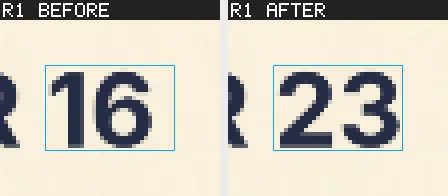
Change only the live Date text from OCTOBER 16 to OCTOBER 23.
Keep the artwork, typography styles and motion graph unchanged.
Save a revised .vdesign copy, inspect the native visual diff, and render
the revised seven-second MP4.
Voyager changed the text and rendered the revised film. Its native diff reported one changed region and no changes outside the edited layer; the motion graph stayed unchanged.
For a poster that will need revisions, separate the objects that move and rebuild the words that change. You can use the downloaded PNG layers in your own motion tool; keep its editable project alongside the final video.
Voyager takes that structure through the whole revision: the agent edits the named text layer, checks what changed and renders from the same saved motion graph. A new date becomes a text edit, instead of another attempt to recreate the approved animation.
Make your next project in Voyager
Create an account, download Voyager, and start making.